Remote work opened the door to flexibility, but it also created serious security problems for businesses. Employees now connect to company systems from home networks, coffee shops, airports, and personal devices that IT teams cannot fully control. That shift has made ransomware attacks, credential theft, and unauthorized access far more common across distributed workplaces.
This is where SaaS platforms improve security for remote work. Instead of relying on office based defenses that only protect users inside a company network, SaaS security tools focus on identity, access, and real time monitoring. Every login request can be verified through features like multi factor authentication, single sign on, and role based permissions. That means businesses can protect sensitive systems no matter where employees work.
Cloud based security controls also make it easier to manage files, user access, and activity from one central location. Security teams gain better visibility across the workforce while reducing the risks tied to unmanaged devices and scattered data storage. For modern companies with remote or hybrid teams, SaaS platforms create a more consistent and scalable way to secure daily operations.
Why Remote Work Creates Bigger Security Risks
Remote work changed how companies operate, but it also changed how cybercriminals attack businesses. In a traditional office setup, employees worked inside a controlled environment protected by company firewalls, monitored networks, and onsite IT teams. Today, workers log in from home networks, shared workspaces, airports, and public Wi Fi connections that are far less secure. That shift has made remote work security a growing concern for organizations of every size.
Many employees also use personal laptops, smartphones, and tablets to access company systems. While this improves flexibility, it creates major security gaps when devices lack updates, encryption, or proper security software. Businesses now face an expanded attack surface because every device, application, and connection point becomes a possible entry path for attackers.
Weak password habits add another layer of risk. Employees often reuse passwords across multiple accounts or store login details in unsecured locations. Once credentials are stolen, attackers can gain access to cloud applications, internal documents, and sensitive customer data within minutes.
Traditional VPNs and office perimeter defenses are also struggling to keep up. These systems were designed for a time when most employees worked inside a company building. Modern remote environments require security controls that follow the user rather than the location.
The Problem With Location Based Security
Older security models trusted users simply because they connected through an office network. That approach no longer works when teams operate across different cities, countries, and devices. Companies now need identity focused protection that verifies every login request regardless of where it comes from.
Common Cyber Threats Facing Remote Teams
Cyber threats in remote work continue to grow as attackers target distributed teams through phishing emails, stolen credentials, shadow IT tools, and unsecured endpoints. A single compromised device or weak password can expose entire business systems. To maintain a secure remote workforce, organizations need stronger visibility, access controls, and continuous monitoring across all remote connections.
How SaaS Platforms Change the Security Model
Traditional cybersecurity systems were built around office environments where employees worked inside company networks protected by physical infrastructure. That model no longer fits modern remote work. Businesses now rely on employees working across multiple locations, devices, and internet connections, which makes location based security far less reliable. SaaS security solutions change this approach by moving protection into the cloud and focusing on user identity instead of network boundaries.
Cloud delivered security tools allow businesses to manage authentication, permissions, monitoring, and data protection from one centralized platform. Instead of depending on scattered hardware appliances or manually managed local systems, IT teams can apply consistent security policies across the entire organization. This creates stronger control over who can access company applications and what actions they can perform.
SaaS authentication tools also strengthen access security through features like multi factor authentication, single sign on, and role based permissions. Every login request can be verified in real time, which helps reduce the risk of unauthorized access from stolen credentials or compromised devices.
Another major advantage is visibility. Security teams can monitor user activity, track suspicious behavior, and review access logs across departments from a single dashboard. That level of centralized oversight is critical for companies managing remote or hybrid workforces.
From Office Perimeters to Identity Based Security
Older security systems trusted users once they entered the company network. Modern SaaS platforms remove that assumption by continuously verifying users, devices, and login activity. Identity becomes the main layer of protection rather than physical location.
Why Cloud Based Security Works Better for Distributed Teams
Cloud security for remote teams works more efficiently because protections follow employees wherever they work. Whether users connect from home, coworking spaces, or personal devices, SaaS platforms maintain consistent security policies without relying on office based infrastructure.
Key SaaS Security Features That Protect Remote Workers
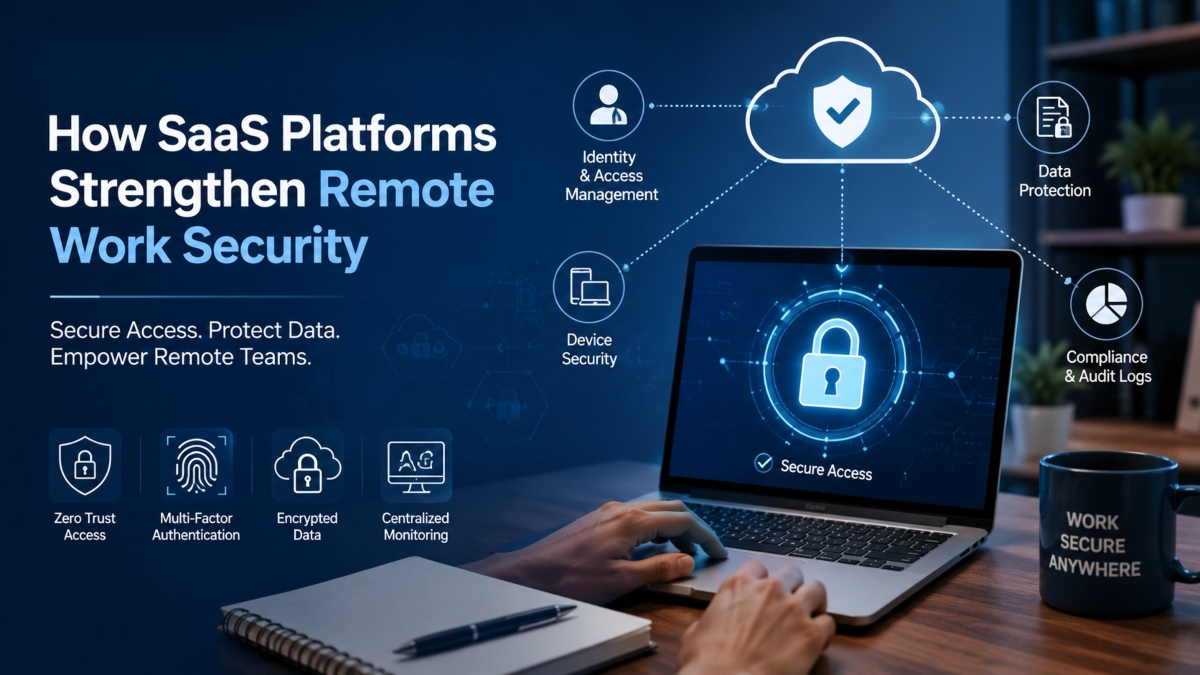
Remote teams need more than basic antivirus software and passwords to stay secure. Employees now access company systems from different locations, devices, and networks every day, which creates more opportunities for cyberattacks. SaaS platforms help reduce those risks by giving businesses centralized security controls that work across cloud applications, collaboration tools, and remote devices. These features help companies protect sensitive data while making remote access easier to manage.
Multi Factor Authentication Improves Login Security
Passwords alone are no longer enough to protect business accounts. Many cyberattacks begin with stolen or reused credentials collected through phishing scams or data leaks. Multi factor authentication adds another verification step before users can access company systems. Employees may need to enter a code from a mobile device, approve a login request, or confirm their identity through biometric verification.
This extra layer makes unauthorized access much harder even if attackers manage to steal passwords. For remote teams working outside office environments, multi factor authentication creates stronger protection without making the login process overly complicated.
Single Sign On Reduces Password Risks
Remote employees often use several cloud applications every day for communication, file sharing, project management, and customer support. Managing separate passwords for every tool can lead to weak password habits and frequent credential reuse.
Single sign on simplifies access by allowing users to log in once and securely access multiple applications from a central authentication system. This reduces password fatigue while giving IT teams more control over account access. If an employee leaves the company, administrators can revoke access across connected systems from one place instead of updating dozens of accounts manually.
Role Based Access Limits Unnecessary Permissions
Not every employee needs access to every system or file. SaaS platforms use role based permissions and least privilege access to limit exposure to sensitive information. Employees only receive the access required for their specific responsibilities.
This approach reduces the chances of internal misuse and helps contain damage if an account becomes compromised. For example, a marketing employee may access campaign tools and analytics dashboards but not financial systems or customer databases. Limiting access in this way creates stronger protection across distributed teams.
Encryption Protects Files and Communication
Remote work often involves sharing files across cloud storage platforms, messaging apps, and collaboration tools. Without strong protection, sensitive information can become exposed during transfers or while stored online.
Many SaaS platforms use encryption to secure data both during transmission and while stored in the cloud. This makes stolen or intercepted information far more difficult for attackers to read. Encryption also reduces the risks tied to lost laptops, unsecured internet connections, and unauthorized file sharing between employees.
Centralized Monitoring Improves Threat Detection
One of the biggest advantages of SaaS security is visibility. Instead of tracking activity across disconnected systems, businesses can monitor user behavior, login activity, file access, and administrative changes from one centralized dashboard.
Real time monitoring helps security teams identify unusual behavior faster, such as repeated failed login attempts, suspicious downloads, or access requests from unfamiliar locations. Many SaaS platforms also maintain detailed audit logs that support compliance reporting and internal investigations.
For remote organizations, centralized monitoring creates stronger oversight without requiring employees to work inside a physical office. Security teams gain a clearer picture of what is happening across the workforce while responding to threats more quickly and consistently.
Multi Factor Authentication Improves Remote Login Security
Passwords remain one of the weakest points in modern cybersecurity. Employees often reuse passwords across multiple accounts or create simple login credentials that attackers can crack quickly. For remote teams working outside protected office environments, that risk becomes even higher. This is why MFA for remote work has become a critical security layer for businesses managing distributed employees.
Multi factor authentication adds extra verification steps before users can access company systems. Instead of relying only on a password, employees may also need to enter a one time code sent to a mobile device, approve a login notification, or verify their identity through fingerprint or facial recognition. Even if attackers steal login credentials through phishing attacks or leaked databases, they still cannot access the account without the second verification factor.
This added protection plays a major role in secure remote access because employees regularly connect from home networks, public Wi Fi, and personal devices that IT teams cannot fully monitor. Multi factor authentication helps businesses confirm that the person attempting to log in is actually the authorized user.
SaaS platforms make MFA easier to manage by allowing administrators to enforce authentication rules across all cloud applications from one centralized system. Security teams can require stronger verification for sensitive accounts while reducing the risk of unauthorized access across the organization.
Single Sign On Simplifies and Secures User Access
Managing multiple passwords across different applications can quickly become a security problem for remote teams. Employees often rely on weak passwords, repeat the same credentials across platforms, or store login information in unsafe ways just to keep up with daily workflows. These habits increase the risk of unauthorized access and credential theft. Single sign on helps solve this problem by creating a more secure and streamlined login experience.
Single sign on allows employees to access multiple business applications using one verified set of credentials. Instead of signing into every tool separately, users authenticate once through a centralized system and gain secure access to approved platforms. This reduces password fatigue while improving overall SaaS access control across the organization.
For remote teams, single sign on creates stronger protection because IT administrators can manage user access from one central dashboard. If an employee changes roles or leaves the company, administrators can quickly update or revoke permissions without manually handling dozens of separate accounts. This reduces the chance of inactive accounts remaining exposed.
Single sign on also improves the user experience. Employees spend less time resetting passwords or struggling with repeated login requests, which helps maintain productivity without weakening security practices. Combined with multi factor authentication, single sign on creates a safer and more efficient way to manage secure access for distributed workforces.
Role Based and Least Privilege Access Strengthen Security Control
One of the biggest security mistakes companies make is giving employees more access than they actually need. When users can reach sensitive systems, files, or applications unrelated to their responsibilities, the risk of accidental exposure and internal misuse increases. Remote work makes this problem even more serious because employees access business systems from different devices and locations every day.
Role based permissions help businesses organize access according to job responsibilities. Employees only receive the tools and data required for their specific tasks. For example, a customer support representative may need access to help desk software and client records but not financial systems or administrative controls. This creates a cleaner and safer structure for identity and access management across the organization.
Least privilege access takes this approach further by limiting permissions to the minimum level necessary for each user. Instead of broad access rights, employees operate within controlled boundaries that reduce unnecessary exposure to sensitive information. If an account becomes compromised through phishing or credential theft, attackers face tighter restrictions that limit how far they can move inside company systems.
SaaS platforms make access governance easier by allowing administrators to create, update, and monitor user permissions from centralized dashboards. Security teams can quickly review access levels, remove outdated permissions, and detect unusual activity without manually checking every application. This improves visibility while reducing insider threats and human error across remote teams.
For organizations managing distributed employees, strong least privilege access policies create an important layer of protection that keeps sensitive systems better controlled and easier to secure.
Encryption and Secure Cloud Storage Protect Sensitive Business Data
Remote employees constantly share files, messages, contracts, and customer information across cloud applications and collaboration platforms. Without proper protection, sensitive data can become exposed during transfers or while stored online. This is why encryption for remote work plays such an important role in modern cybersecurity strategies.
Encryption protects information by converting data into unreadable code that only authorized users or systems can access. Whether files are being uploaded, downloaded, shared, or stored in the cloud, encryption helps prevent attackers from reading stolen or intercepted information. Even if cybercriminals gain access to the data, the content remains useless without the correct decryption keys.
This layer of protection is especially valuable for remote work data protection because employees often connect through home internet connections, public Wi Fi, and personal devices outside company controlled environments. Businesses cannot always guarantee the security of every network employees use, but encryption helps reduce the risks tied to unsecured connections.
Secure cloud storage also lowers exposure from lost or stolen devices. Instead of storing important files directly on laptops or mobile phones, SaaS platforms keep data inside protected cloud environments with controlled access permissions. Employees can collaborate on documents, share updates, and manage projects without sending sensitive attachments through unsecured email chains.
Many SaaS platforms combine encryption with access controls, file activity tracking, and automated backups to create stronger protection for distributed teams. This allows organizations to maintain secure collaboration while keeping company information safer across remote work environments.
Centralized Monitoring and Audit Logs Improve Security Visibility
Remote work makes it harder for businesses to track user activity across devices, applications, and locations. Employees connect from home offices, personal laptops, shared networks, and cloud platforms throughout the day, which creates more blind spots for security teams. Without clear visibility, suspicious behavior can go unnoticed until serious damage occurs. This is where centralized security management becomes extremely valuable.
SaaS platforms allow businesses to monitor user activity, login attempts, file access, permission changes, and administrative actions from one unified dashboard. Instead of reviewing disconnected systems separately, IT teams gain a complete view of what is happening across the organization in real time. This improves security visibility while making it easier to identify unusual activity before it escalates into a larger incident.
Audit logging also plays an important role in protecting remote environments. SaaS platforms automatically record security events and user actions, creating detailed logs that help organizations investigate incidents and track system changes. If an employee account shows suspicious login behavior or unauthorized file access, security teams can quickly trace the activity and respond faster.
Centralized monitoring improves threat detection by helping businesses spot failed login attempts, unusual device activity, access requests from unfamiliar locations, and sudden spikes in file downloads. Faster detection leads to faster incident response, which can reduce financial losses and limit operational disruption.
Audit logging also supports compliance efforts by creating clear records for security reviews, internal investigations, and regulatory reporting. For businesses managing remote teams, centralized security management provides stronger oversight and better control across an increasingly distributed workforce.
How SaaS Supports Zero Trust Security
Traditional cybersecurity models assumed users inside a company network could be trusted automatically. That approach no longer works in remote environments where employees connect from different cities, personal devices, and unsecured networks every day. SaaS platforms support a more modern security strategy known as zero trust architecture, where every access request must be verified before permission is granted.
Instead of trusting users based on location, SaaS systems continuously evaluate identity, device status, login behavior, and access permissions. This creates stronger protection for remote teams because security controls follow the user rather than relying on office based defenses. Zero trust remote access helps businesses reduce the risks tied to stolen credentials, compromised devices, and unauthorized activity across cloud applications.
Another major advantage is reduced lateral movement. In older network models, attackers who gained access to one system could often move freely across connected environments. SaaS platforms limit this risk by restricting access to only approved applications and resources. Even if a user account becomes compromised, attackers face tighter boundaries that prevent broader system exposure.
Continuous authentication also strengthens security by checking user activity throughout active sessions instead of verifying identity only during login. If suspicious behavior appears, access permissions can be restricted immediately or additional verification can be requested.
What Zero Trust Means for Remote Work
Zero trust security operates on a simple principle: never trust automatically and always verify. Every login request, device connection, and application access attempt must be validated before users receive permission. For remote organizations, this creates a safer framework that protects systems regardless of where employees work.
Device Checks and Conditional Access Policies
Many SaaS platforms also perform device posture checks before granting access to sensitive systems. These checks confirm whether a device meets company security standards, such as updated software, active encryption, or installed endpoint protection. Conditional access policies can then block risky devices or require additional authentication steps for higher risk login attempts.
This combination of identity verification, continuous monitoring, and device posture checks gives businesses stronger control over remote security without limiting workforce flexibility.
Business Benefits of SaaS Security for Remote Teams
As remote and hybrid work continue to grow, businesses need security systems that are easier to manage, flexible enough to scale, and strong enough to protect sensitive data across multiple locations. SaaS platforms help organizations meet these demands by simplifying security operations while creating more consistent protection for a secure distributed workforce.
One of the biggest advantages is reduced pressure on internal IT teams. Traditional security systems often require manual updates, hardware maintenance, and onsite management that become difficult when employees work remotely. SaaS platforms centralize security administration through cloud based dashboards, allowing IT teams to manage user access, authentication policies, monitoring, and updates from one location. This reduces operational complexity while improving response times during security incidents.
SaaS tools also help businesses onboard employees faster. New hires can receive secure access to approved applications within minutes through automated account provisioning and role based permissions. Instead of configuring multiple systems manually, administrators can apply predefined access policies that keep onboarding both efficient and secure.
Another major benefit is scalability. As companies grow, SaaS security policies can expand across departments, locations, and devices without requiring expensive infrastructure changes. Businesses can apply consistent protections to remote employees, contractors, and hybrid teams while maintaining visibility across the organization.
Easier Security Management Across Distributed Teams
Managing security across remote environments becomes much simpler when policies, monitoring, and user permissions operate through centralized systems. SaaS platforms allow businesses to enforce consistent rules across cloud applications while reducing the risks tied to disconnected security tools and unmanaged access points.
Better Compliance and Audit Readiness
SaaS governance and compliance features also help businesses maintain stronger regulatory oversight. Many platforms include automated audit logging, activity tracking, reporting tools, and permission reviews that support internal security checks and compliance requirements. This makes it easier for organizations to prepare for audits, monitor policy enforcement, and maintain accurate security records across remote operations.
By combining centralized management, scalable controls, and stronger visibility, SaaS platforms create a more practical and reliable security model for modern remote teams.
Best Practices for Securing Remote Work With SaaS Platforms
SaaS platforms provide strong security features for remote teams, but businesses still need clear policies and consistent management to reduce risks effectively. Remote environments change constantly as employees switch devices, locations, and applications throughout the workday. Without proper oversight, even advanced security tools can leave gaps that attackers may exploit.
One of the most important steps is enforcing multi factor authentication across every business application. Passwords alone cannot protect remote accounts from phishing attacks or credential theft. Adding extra verification layers creates stronger protection for employees accessing systems from home networks or public internet connections.
Businesses should also perform regular access reviews to ensure employees only have permissions relevant to their current responsibilities. Over time, users often accumulate unnecessary access rights that increase security risks. Reviewing permissions regularly helps remove outdated accounts, restrict sensitive access, and improve overall security control.
Employee cybersecurity training also remains essential. Many remote security incidents begin with phishing emails, fake login pages, or unsafe downloads. Training employees to recognize suspicious activity can reduce human error and strengthen company wide security awareness.
Another important practice involves monitoring suspicious login activity. SaaS platforms often provide alerts for failed login attempts, unusual device behavior, or access requests from unfamiliar locations. Responding quickly to these warnings can help businesses stop threats before attackers gain deeper access.
Organizations should also keep SaaS permissions, software settings, and endpoint protections updated consistently. Devices used for remote work need active antivirus tools, system updates, encryption, and security patches to reduce exposure to vulnerabilities.
Build a Strong Identity and Access Strategy
A strong identity and access strategy helps businesses control who can access company systems and what actions users can perform. Combining multi factor authentication, role based permissions, and regular access reviews creates stronger protection across remote environments.
Combine SaaS Security With Employee Awareness
Technology alone cannot stop every security threat. Employees play a major role in protecting business systems, especially in remote settings where IT teams have less direct oversight. Combining SaaS security tools with regular employee awareness training creates a stronger defense against phishing attacks, credential theft, and unsafe online behavior.
Final Thoughts
Remote work is no longer a temporary shift for most businesses. Companies now operate across home offices, shared workspaces, mobile devices, and cloud applications every day. That level of flexibility creates new security challenges that traditional office focused defenses struggle to handle. SaaS platforms offer a more practical solution by moving security controls closer to the user instead of relying on physical network boundaries.
With identity first security, businesses can verify every login request, control user permissions, and protect sensitive systems regardless of where employees work. Features like multi factor authentication, centralized monitoring, encryption, and role based access create stronger protection across distributed environments without adding unnecessary complexity for users.
Centralized visibility also gives IT and security teams better oversight across the organization. Administrators can monitor activity, detect suspicious behavior, manage permissions, and respond to threats from a single cloud based platform. This makes security operations faster, more consistent, and easier to scale.
For remote and hybrid teams, SaaS platforms provide flexible protection that adapts as businesses grow. Companies can strengthen security policies, support compliance requirements, and manage remote access without investing heavily in physical infrastructure or complicated onsite systems. In modern work environments, SaaS security creates a smarter and more scalable path for protecting employees, applications, and business data.