Many people search for how VPNs work after hearing about online privacy, streaming access, or public WiFi safety. The term sounds technical at first, which is why VPNs often confuse everyday internet users. Some people think a VPN makes them invisible online, while others assume it is only useful for tech experts. In reality, the idea is much simpler than it sounds.
A VPN, short for Virtual Private Network, creates a private connection between your device and the internet. Instead of sending your data openly across a network, it protects that information through encryption and routes it through a secure server. This helps hide your online activity from internet providers, hackers on public WiFi, and other outside observers.
Think about using free WiFi at a café or airport. Without protection, your personal information could become easier to intercept. A VPN adds an extra layer of security while also helping protect your privacy online. This guide breaks everything down in plain language so you can understand exactly what happens behind the scenes without needing a technical background.
What Is a VPN?
A VPN is a tool that helps protect your internet connection and online privacy. If you have ever searched “what is a VPN” or wanted a VPN explained simply, the easiest way to understand it is to think of it as a private path between your device and the internet.
When you browse online without a VPN, your internet traffic travels through your internet provider in a more visible way. A VPN adds protection by securing that connection and hiding parts of your online activity from outside observers.
What Does VPN Stand For?
VPN stands for Virtual Private Network. While the name sounds technical, the idea is actually straightforward.
“Virtual” means the connection exists digitally rather than through physical cables. “Private” means your internet activity becomes more protected. “Network” refers to the connection between your device and the internet.
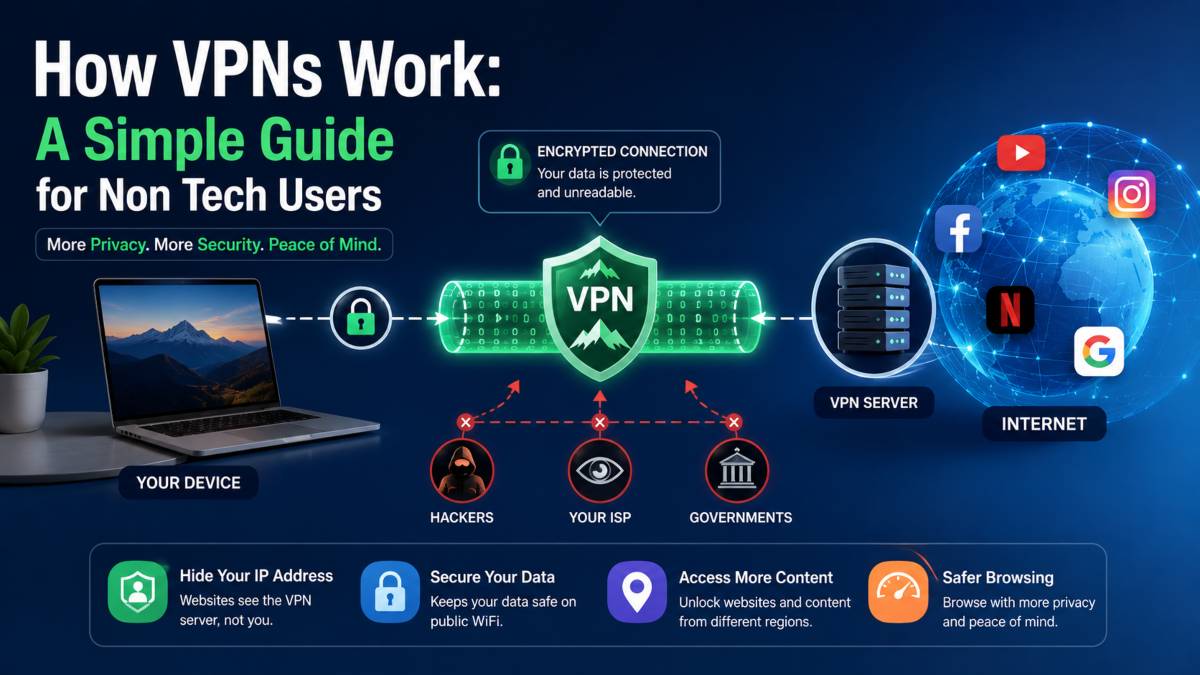
A simple analogy is driving through a private tunnel instead of an open road. People outside the tunnel cannot clearly see where you are going or what you are doing inside. A VPN works in a similar way by creating a more secure route for your online traffic.
Why People Use VPNs
Many people use VPNs for privacy and safer browsing, especially on public WiFi in places like cafés, hotels, and airports. Public networks can expose your data to unwanted attention, while a VPN adds another layer of protection.
VPNs are also popular for reducing online tracking and changing virtual locations. For example, websites often use your IP address to estimate where you are browsing from. A VPN can mask that location by routing your traffic through another server.
For beginners, a VPN is less about complicated technology and more about creating a safer and more private online experience.
How VPNs Work Step by Step
Many people hear about VPNs but still wonder how VPNs work behind the scenes. The good news is that the process is much easier to understand than it sounds. A VPN works by creating a protected connection between your device and the internet, helping keep your activity more private while you browse.
Here is a simple breakdown of how does a VPN work from start to finish.
You Connect to a VPN App
The process begins when you open a VPN app on your phone, laptop, or tablet. Most VPN apps have a large connect button and a list of server locations around the world.
You can choose a nearby server for faster browsing or select another country if you want your connection to appear from a different location. Once you tap connect, the app starts building a secure connection between your device and the VPN server.
At this point, your internet traffic is preparing to move through a safer route instead of traveling openly across the network.
The VPN Creates an Encrypted Tunnel
After the connection starts, the VPN creates what is often called an encrypted tunnel. This is the part that usually sounds confusing, but it is actually simple.
Encryption means your information gets scrambled into unreadable code while it travels online. If someone tries to intercept the data, they would only see meaningless characters instead of your actual activity.
Think of it like placing a letter inside a locked box before sending it through the mail. People may see the box moving, but they cannot open it or read what is inside.
The “tunnel” is simply the protected route that carries your information safely between your device and the VPN server.
Your Traffic Travels Through the VPN Server
Once the tunnel is active, your internet traffic passes through the VPN server before reaching websites or online services.
The VPN server acts like a middle layer between you and the internet. Instead of connecting directly to a website, your request first goes through the VPN server, which then forwards it to the final destination.
This matters because your internet provider can no longer clearly view the websites you visit or the information moving through the connection. They mainly see encrypted traffic traveling between your device and the VPN server.
For example, imagine sitting in a café using free WiFi while checking your banking app. Without a VPN, someone on the same network may attempt to monitor your connection. With a VPN active, your traffic becomes much harder to read because it is protected inside the encrypted connection.
Websites See the VPN Server Instead of You
One of the biggest reasons people use VPNs is IP address masking.
Every internet connection has an IP address, which acts like a digital location tag. Websites use this address to estimate where you are browsing from.
When using a VPN, websites no longer see your original IP address. Instead, they see the IP address of the VPN server. If you connect through a server in another country, websites may think you are browsing from that location instead of your real one.
This can help reduce basic tracking and allow access to region based content.
Data Returns Through the Secure Connection
After a website responds to your request, the information travels back through the VPN server and returns to your device through the same protected connection.
The VPN encrypts the returning data so it stays protected while moving across the network. Once it reaches your device, the VPN app unlocks the information so you can view the webpage, video, or app normally.
From your perspective, everything feels almost the same as regular browsing. The difference is that your connection now has an extra layer of privacy and security working quietly in the background.
What Does a VPN Hide?
One of the main reasons people use VPNs is for better privacy online. A VPN adds protection to your internet connection and hides certain details from websites, internet providers, and people using the same public network. Still, it is important to understand both what a VPN can hide and what it cannot.
Your IP Address
A VPN hides your real IP address by replacing it with the IP address of the VPN server. This process is often called IP address masking.
Your IP address works like a digital identifier that can reveal your general location and internet provider. Without a VPN, websites can use this information to track browsing activity and build advertising profiles.
When a VPN is active, websites see the VPN server instead of your actual connection. This creates an extra layer of VPN privacy protection and helps reduce direct tracking.
Browsing Activity on Public Networks
Public WiFi networks in cafés, airports, and hotels are not always secure. Without protection, people on the same network may try to monitor internet traffic.
A VPN protects your connection by encrypting the data moving between your device and the VPN server. This makes secure browsing much easier on shared networks because outsiders cannot easily read your activity.
For example, if you log into your email while connected to public WiFi, a VPN helps keep that connection more private from anyone attempting to spy on the network.
Your Location
Because websites see the VPN server location instead of your own, a VPN can also hide your real geographic location. If you connect through a server in another country, websites may assume you are browsing from there.
However, VPNs do not make you completely invisible online. Websites can still track activity through cookies, browser fingerprints, or logged in accounts. A VPN also cannot protect your device from malware or unsafe downloads.
A VPN improves privacy and security, but it works best when combined with safe browsing habits and strong account protection.
Main Benefits of Using a VPN
Many people start using a VPN because they want a safer and more private internet experience. While VPNs are not a complete security solution, they offer several practical advantages for everyday browsing. Understanding these VPN benefits can help you decide whether using one makes sense for your daily online activity.
Better Privacy Online
One of the biggest reasons people use a VPN is to improve online privacy. Without a VPN, your internet provider can see much of your browsing activity and connection details. A VPN encrypts your traffic, which makes that information harder for outsiders to monitor.
This extra layer of privacy becomes useful during everyday activities like online shopping, banking, or checking personal emails. Instead of sending information openly across the network, your connection travels through a protected route.
For many users, this added privacy creates more peace of mind while browsing.
Safer Public WiFi Browsing
Public WiFi networks are convenient, but they are not always safe. Airports, cafés, hotels, and shopping centers often provide open internet connections that can attract cybercriminals looking for vulnerable users.
VPN security becomes especially useful in these situations. By encrypting your internet traffic, a VPN helps reduce the risk of someone intercepting your data on the same network.
For example, if you connect to free WiFi at a coffee shop and log into your banking app, a VPN adds another layer of protection between your device and the internet.
Reduced Tracking
Many websites and advertisers track user behavior online. They collect information about browsing habits, search history, and approximate location to build advertising profiles.
A VPN helps reduce some of this tracking by masking your IP address. Since websites see the VPN server instead of your real connection, it becomes harder to directly link activity back to your device.
This does not completely stop tracking, especially if you stay logged into online accounts, but it does add another privacy barrier.
Access to Region Restricted Content
Another reason people use VPNs is to access content that may only be available in certain countries or regions. Because a VPN can change your visible location, some services may show different libraries, websites, or search results.
For example, travelers sometimes use a VPN to access services from their home country while abroad.
For beginners, the main value of a VPN is simple. It creates a more private and secure browsing experience without requiring advanced technical knowledge.
What a VPN Cannot Do
VPNs are useful tools for privacy and safer browsing, but they are not perfect. One of the biggest VPN myths is the idea that a VPN solves every online security problem. Understanding VPN limitations helps you use the technology more realistically and avoid a false sense of security.
A VPN Does Not Make You Anonymous
Many people assume a VPN makes them completely invisible online, but that is not true. A VPN hides your IP address and encrypts your internet traffic, yet websites can still collect data through cookies, browser tracking, and logged in accounts.
For example, if you sign into social media while using a VPN, the platform still knows who you are because you logged into your account.
A VPN improves privacy, but it does not erase your digital footprint entirely. This is one of the most important VPN security facts beginners should understand.
A VPN Cannot Stop Malware
A VPN protects your internet connection, but it cannot stop viruses, ransomware, or malicious downloads from infecting your device.
If you click a harmful link, install unsafe software, or open a fake email attachment, a VPN cannot block the damage by itself. You still need antivirus software, safe browsing habits, and regular software updates.
Think of a VPN as one layer of online protection rather than a complete security system.
VPNs May Slow Internet Speeds
Because your traffic travels through an extra server and gets encrypted along the way, a VPN can sometimes reduce internet speed.
The slowdown is usually small with high quality providers, but factors like server distance, network congestion, and encryption strength can affect performance. For example, connecting to a nearby server often feels faster than connecting to one on the other side of the world.
Streaming, gaming, and large downloads may occasionally feel slower when a VPN is active.
You Still Need Strong Passwords and 2FA
A VPN cannot protect weak passwords or unsecured accounts. If someone guesses your password, a VPN will not stop them from accessing your account.
Strong passwords and two factor authentication remain essential for online safety. Two factor authentication adds another verification step, making it harder for attackers to break into accounts even if passwords become exposed.
The safest approach combines a VPN with smart security habits instead of relying on one tool alone.
VPN Protocols Explained Simply
When learning about VPNs, you may come across terms like OpenVPN, WireGuard, or IKEv2/IPsec. These are known as VPN protocols. While the names sound technical, the basic idea is simple.
VPN protocols are the rules and methods a VPN uses to move your data securely across the internet. You can think of them like different delivery routes. Some routes focus more on speed, while others focus more on stability or security.
Understanding VPN protocols helps beginners choose a VPN service with more confidence.
What Is a VPN Protocol?
A VPN protocol controls how your device connects to the VPN server and how your information stays protected during the journey.
The protocol decides things like:
- How data gets encrypted
- How fast the connection feels
- How stable the connection remains
- How devices communicate with the VPN server
Different protocols are built for different situations, but most modern VPN apps automatically choose the best option for everyday users.
OpenVPN
OpenVPN is one of the most trusted VPN protocols available today. It has been widely used for years because it offers a strong balance between privacy, security, and reliability.
Many VPN providers still use OpenVPN as a default choice for secure browsing. It works well on most devices and handles encrypted traffic safely, though it can sometimes feel slightly slower compared to newer protocols.
For beginners, OpenVPN is often considered a safe and dependable option.
WireGuard
WireGuard is a newer protocol designed to deliver faster speeds and simpler performance. In many cases, it connects more quickly and uses less system power than older protocols.
When people compare WireGuard vs OpenVPN, the biggest difference is usually speed. WireGuard often feels smoother for streaming, gaming, and mobile browsing while still offering strong security.
Because of its lightweight design, many modern VPN apps now recommend WireGuard for everyday use.
IKEv2/IPsec
IKEv2/IPsec is another popular VPN protocol, especially for smartphones and mobile devices.
One of its biggest strengths is stability when switching between networks. For example, if your phone moves from mobile data to WiFi, IKEv2/IPsec can reconnect quickly without interrupting the VPN connection.
It is commonly used by people who travel often or regularly switch between internet connections throughout the day.
How to Choose the Right VPN
With hundreds of VPN services available online, choosing a VPN can feel overwhelming for beginners. Many providers promise fast speeds, total privacy, and unlimited access, but not every service delivers the same level of quality or security.
The best VPN for beginners should be easy to use, reliable, and transparent about how it handles user data. Instead of focusing only on flashy marketing, it helps to look at a few important features before making a decision.
Check Privacy Policies
One of the first things to review is the VPN provider’s privacy policy. Since your internet traffic passes through the VPN company’s servers, you want to know how they handle user information.
Look for providers that clearly explain:
- What data they collect
- Whether they keep activity logs
- How long information is stored
- Whether independent security audits have been completed
A trustworthy VPN should explain its privacy practices in plain language rather than hiding details inside confusing legal text.
Look for a Kill Switch
A kill switch is one of the most useful VPN safety tips beginners should know.
This feature automatically blocks internet access if the VPN connection suddenly drops. Without it, your real IP address and browsing activity could become visible for a short time without you noticing.
For example, if your VPN disconnects while using public WiFi at an airport, the kill switch helps prevent your device from reconnecting openly to the network.
Many quality VPN apps include this feature inside their settings menu.
Choose Fast Nearby Servers
Server location can affect both speed and browsing performance. In most cases, nearby servers provide faster and more stable connections because your data travels a shorter distance.
If you mainly use a VPN for secure browsing, online banking, or public WiFi protection, choosing a local server is usually the best option.
Servers in distant countries may still be useful when accessing region specific content, but they can sometimes increase loading times or reduce download speeds.
Avoid Free VPN Risks
Free VPNs may sound attractive, but some come with serious limitations and privacy concerns. Certain free services collect user data, display excessive ads, or offer weak security protections.
Others limit speed, server access, or monthly usage, making the browsing experience frustrating.
This does not mean every free VPN is unsafe, but beginners should research providers carefully before installing one. A reliable VPN with strong privacy standards often delivers a safer and smoother experience in the long run.
When Should You Use a VPN?
Many people think VPNs are only necessary for tech experts or privacy enthusiasts, but there are several everyday situations where using one makes practical sense. Knowing when to use a VPN can help you browse more safely and reduce unnecessary exposure online.
Traveling
Traveling is one of the most common reasons people turn on a VPN. Hotels, airports, and public spaces often rely on shared internet connections that may not be fully secure.
A VPN helps protect your connection while checking emails, accessing banking apps, or signing into personal accounts during trips. It can also help maintain access to websites or services from your home country while abroad.
For frequent travelers, using a VPN regularly becomes an easy habit.
Using Airport or Café WiFi
Public WiFi networks are convenient, but they can also create security risks. Open connections in cafés, airports, libraries, and shopping centers may allow others on the same network to monitor traffic more easily.
Using a VPN for public WiFi adds another layer of privacy by encrypting your internet activity. Even if someone attempts to intercept data on the network, the information becomes much harder to read.
This extra protection is especially useful when logging into accounts or entering payment details on shared networks.
Remote Work
Remote workers often handle sensitive information outside traditional office environments. A VPN helps create a more secure connection when accessing company files, emails, or internal systems from home or public networks.
Many businesses require employees to use VPNs as part of their security policies.
Streaming and Browsing
Some people use VPNs during streaming and general browsing to reduce tracking or access content from different regions. For VPN everyday use, many users simply leave the app running quietly in the background while browsing, shopping, or using social media.
Final Thoughts
Understanding how VPNs work does not require advanced technical knowledge. At its core, a VPN simply creates a more private and secure connection between your device and the internet. It helps protect your browsing activity, hides your IP address, and adds extra security when using shared networks like airport or café WiFi.
Still, it is important to keep realistic expectations. A VPN is not a complete cybersecurity solution, and it cannot replace safe online habits. Strong passwords, two factor authentication, software updates, and careful browsing still matter every day.
For most people, the biggest value of a VPN comes from peace of mind. Whether you are traveling, working remotely, streaming content, or browsing on public WiFi, a VPN adds another layer of privacy that helps reduce unnecessary exposure online.
The internet will probably never become fully private, but using a VPN is one simple step that can make everyday browsing feel much safer and more controlled.